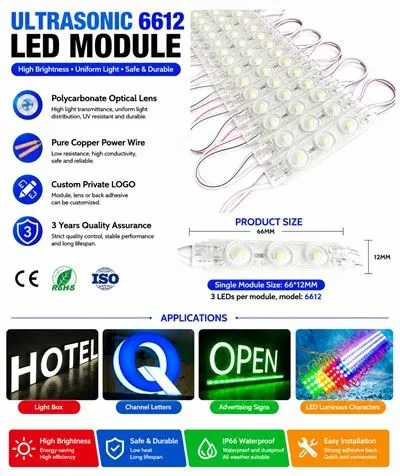
Hey there! As a supplier of 4LEDs Square LED Modules, I totally get how frustrating it can be when these nifty little modules don't work as expected. But don't worry, I'm here to walk you through some troubleshooting steps to get your 4LEDs Square LED Module up and running again.
Check the Power Supply
The first thing you gotta do is check the power supply. A lot of times, the problem can be as simple as a loose connection or an issue with the power source.
- Inspect the Wires: Make sure all the wires connecting the LED module to the power supply are properly plugged in. Sometimes, vibrations or movement can cause the wires to come loose. Give them a gentle tug to ensure they're secure.
- Verify the Voltage: These 4LEDs Square LED Modules usually operate at a specific voltage. Check the product specifications to confirm the correct voltage. If you're using a power supply with the wrong voltage, it can cause the module to malfunction or not work at all. You can use a multimeter to measure the voltage at the power supply output.
- Test the Power Supply: If you suspect the power supply is the problem, try using a different power supply. This can help you determine if the issue lies with the power source or the LED module itself.
Look for Physical Damage
Physical damage can also cause the 4LEDs Square LED Module to stop working. Take a close look at the module for any signs of damage.
- Check for Broken LEDs: Look for any LEDs that are cracked, shattered, or not lighting up. If you find a broken LED, it might need to be replaced. However, replacing individual LEDs can be a bit tricky, so you might want to consider getting a new module if the damage is extensive.
- Inspect the Circuit Board: Check the circuit board for any signs of burns, shorts, or loose components. A damaged circuit board can prevent the module from functioning properly. If you notice any damage, it's best to replace the module.
- Examine the Housing: Make sure the housing of the module is intact. A cracked or damaged housing can expose the internal components to moisture, dust, or other contaminants, which can lead to malfunctions.
Check the Connections
Proper connections are crucial for the 4LEDs Square LED Module to work correctly. Here are some things to check:
- Soldering Joints: If the module has soldered connections, check them for any signs of poor soldering, such as cold joints or loose solder. You can use a magnifying glass to get a better look at the joints. If you find any issues, you might need to re-solder the connections.
- Connector Pins: If the module uses connector pins, make sure they are clean and not bent. Dirty or bent pins can cause poor electrical contact, which can lead to problems. You can use a small brush or compressed air to clean the pins.
- Wiring Harness: Check the wiring harness for any frayed or damaged wires. A damaged wiring harness can disrupt the electrical signal and cause the module to malfunction. If you find any damaged wires, you'll need to repair or replace the wiring harness.
Test the Control System
If your 4LEDs Square LED Module is controlled by a specific system, such as a controller or a remote, make sure it's working properly.
- Check the Controller Settings: Review the settings on the controller to ensure they are configured correctly for the LED module. Incorrect settings can cause the module to behave erratically or not work at all. Refer to the controller's user manual for instructions on how to set it up correctly.
- Test the Remote: If you're using a remote to control the module, check the batteries and make sure the remote is working. You can try pressing different buttons on the remote to see if the module responds. If the remote isn't working, you might need to replace the batteries or the remote itself.
- Verify the Communication: If the module communicates with the controller wirelessly, make sure there are no interference issues. Obstacles, other electronic devices, or radio frequency interference can disrupt the communication between the module and the controller. Try moving the module and the controller closer together or away from potential sources of interference.
Consider Environmental Factors
Environmental factors can also affect the performance of the 4LEDs Square LED Module.
- Temperature and Humidity: Extreme temperatures and high humidity can cause the module to malfunction. Make sure the module is installed in an environment with suitable temperature and humidity levels. If the module is exposed to harsh conditions, you might need to use a protective enclosure or take other measures to protect it.
- Dust and Dirt: Dust and dirt can accumulate on the LEDs and the circuit board, which can affect the module's performance. Regularly clean the module using a soft, dry cloth to remove any dust or dirt.
- Moisture: Moisture can cause short circuits and other problems. If the module is installed in a wet or damp environment, make sure it is properly sealed and waterproof. You can use waterproof modules like the Waterproof RGB Square Modules For Signs to ensure reliable operation in such conditions.
Other Troubleshooting Tips
Here are some additional tips that might help you troubleshoot the 4LEDs Square LED Module:
- Reset the Module: Some LED modules have a reset function. Try resetting the module according to the manufacturer's instructions. This can sometimes fix minor glitches or errors.
- Update the Firmware: If the module has firmware, check if there are any updates available. Updating the firmware can improve the module's performance and fix known issues.
- Contact Technical Support: If you've tried all the above steps and still can't get the module to work, don't hesitate to contact our technical support team. We're here to help you resolve any issues you might be having with our products.
Conclusion
Troubleshooting a non - working 4LEDs Square LED Module might seem daunting at first, but by following these steps, you can usually identify and fix the problem. Remember to check the power supply, look for physical damage, verify the connections, test the control system, and consider environmental factors.
If you're in the market for high - quality LED modules, we also offer other great products like the SMD5050 RGB IC 12v Led Module and the 1.5w LED Injection Module.

If you have any questions or are interested in purchasing our products, feel free to reach out to us for a procurement discussion. We're always happy to assist you in finding the right LED solutions for your needs.
References
- General knowledge of LED module technology and troubleshooting.
- Product specifications and user manuals of 4LEDs Square LED Modules.